How to Generate a Splice License on Unchained Music
When you're making music, finding the right sounds can be the difference between a decent track and a banger. That’s where Splice music samples come in. As one of the most popular platforms for producers, Splice offers an extensive library of loops, one-shots, and synths that cater to all kinds of genres and styles. While their royalty-free content makes creating music easy, it’s important to understand how licensing works when using Splice samples, especially if you're sharing your music on platforms like YouTube or Spotify. In this post, we’ll walk you through how to generate a Splice license for your samples, so you can stay legally covered while creating your next hit.
Ready to turn your tracks into streams?
Distribute your music globally, and keep 100% of your royalties, with Unchained Music. Upload, manage, and release your songs to 220+ streaming platforms in minutes. Sign up now and take full control of your music career.
What Is a Splice License? Understanding the Basics
When you use Splice samples, whether loops, one-shots, or sound packs, you are typically working with royalty-free content. This means you can use the samples in your music production without having to worry about paying royalties every time your track is played. However, having access to the samples through a Splice subscription doesn’t automatically grant you a license to use them for commercial purposes.
A Splice license is a legal agreement that confirms you have permission to use these sounds in your music without infringing on the rights of others. It’s especially important when you're looking to upload or distribute your music on platforms such as Spotify, YouTube, or other streaming services. By generating this license, you ensure that your use of Splice samples is compliant with the terms and conditions set by Splice and protects you legally.
Once you generate the certified license, it provides peace of mind, knowing you have the proper permissions to use your samples in everything from songs to video projects, whether for personal use or commercial ventures.

Generating Your Splice License: A Simple Process
The good news is that generating a certified Splice license for your samples is a straightforward process. Here’s how to do it:
- Search for the Sample You Want to Use
Whether you're looking for drums, vocals, synths, or anything in between, you can search through Splice’s vast sample library to find the perfect sound. With thousands of selected samples to choose from, it’s easy to find the perfect sound to match your track. You can also filter your results depending on the genre or mood you want to create, whether it’s an upbeat track for Spotify or a cinematic piece for a YouTube video.
- Download the Sample
Once you’ve found the sample you want, simply download it. This step is essential because the licensing process is tied directly to the content you’ve downloaded, and you will need to generate the license for each sample you use in your projects. - Generate the License
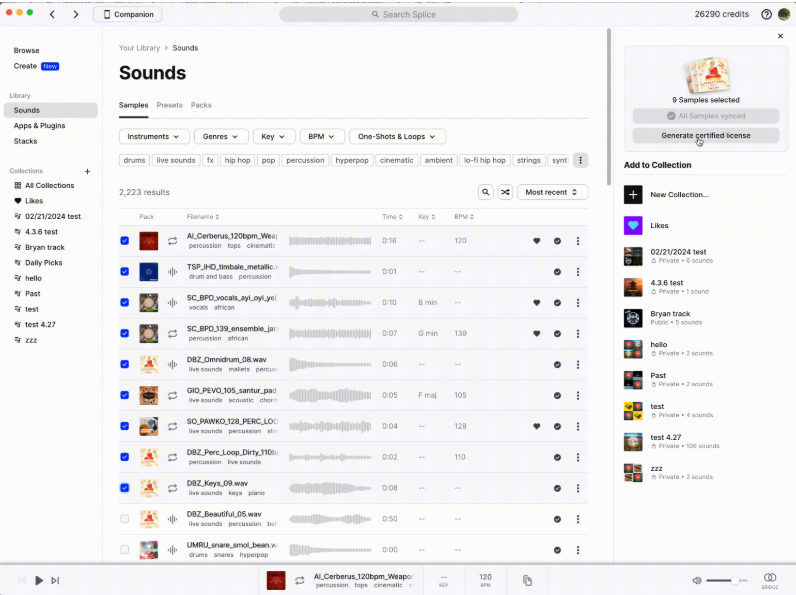
After downloading your Splice samples, the next step is to generate the certified license for your content. This is a crucial process, as it ensures that each sample you plan to use in your music production is legally cleared for commercial use, so you can confidently distribute your song or mix without any legal concerns. - To generate your Splice license, simply go to your Splice account and navigate to Your Sounds. From there, select the sample(s), whether it's a loop, one-shot, or a combination of sounds, that you want to license.
- Once you’ve selected your samples, you can generate the certified license by clicking on the ⋮ dropdown or selecting the option directly from the sidebar. You’ll then be prompted to enter your full legal name, along with the artist or producer name you plan to use when releasing the work. This is essential for ensuring the license is associated with your official identity.
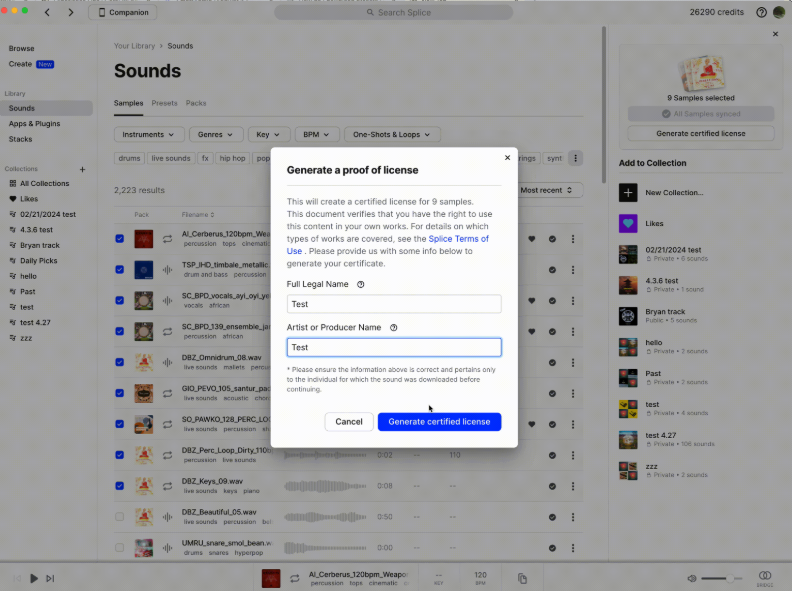
- When everything is filled out, click on ‘Generate certified license’, and the system will create a PDF document. The PDF will automatically download to your browser's downloads folder. This document serves as proof that you have the necessary legal rights to use the samples in your commercial release.
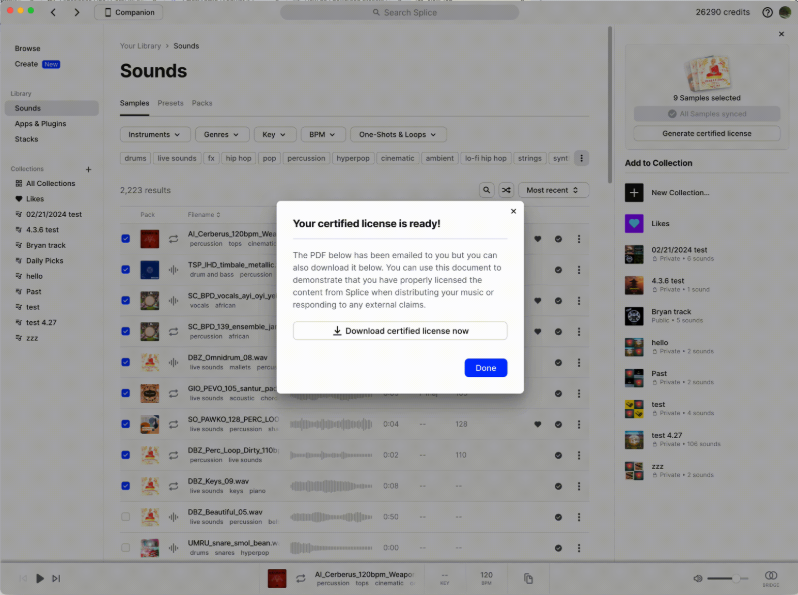
From here, you can easily upload the license document whenever you submit your release to any platform, whether it's Spotify, YouTube, or other distribution services. This not only protects you legally but also demonstrates your compliance with Splice’s licensing terms, ensuring a smooth process when sharing or selling your music.
Splice Loops and One-Shots: What You Need to Know About Licensing
When diving into music production, Splice loops and one-shots are among the most useful tools in your arsenal. Whether you're laying down the foundation of a new track or adding the perfect synth line, Splice samples give you endless possibilities. But it’s important to understand the difference between these two types of samples and how their licensing works.
Loops are pre-recorded sequences of sound, often rhythm-based, which can be used to build the backbone of a track. One-shots, on the other hand, are individual sounds, such as snare hits, vocal snippets, or bass notes, that can be used to create unique sounds and melodies. Both are royalty-free once licensed, but the license protects your right to use them in music production and distribution.
While Splice loops and one-shots are typically ready to use in your mixes or songs, generating the Splice license for each sample ensures you are fully covered if you plan to upload or distribute your music commercially. Without the license, your samples may be flagged, potentially causing issues with platforms like Spotify or YouTube.
Sample Libraries: Organizing and Using Your Splice Samples with Confidence
One of the best things about Splice is the vast sample library it offers, with an extensive selection of loops, one-shots, and synths to help bring your music to life. However, with so many options, it’s easy to get overwhelmed. Here are some tips on how to stay organized and use your Splice samples confidently:
- Organize Your Samples by Category
It’s easy to get lost in the sea of sounds on Splice, so take the time to organize your samples into categories that make sense for your project. Create folders for specific genres, types of sounds (e.g., drums, bass, vocals), or even moods (e.g., uplifting, dark, ambient). This will make it easier to find what you need when you start creating. - Use Tags to Sort Your Samples
Splice offers a tagging system that allows you to mark samples with keywords based on their characteristics. For example, if you're working on a song and need a punchy kick drum, you can search for tags like "punchy," "percussive," or "deep." This makes it easier to find the perfect sound without scrolling endlessly through your library. - Select Your Playlist
As you accumulate samples that you enjoy using in your music production, consider selecting a playlist of your favorites. This will save you time when you’re ready to get to work on your next track. Plus, it will give you a great resource of go-to sounds that you can rely on for future projects.
What Happens if You Don’t Have a Splice License for Your Music Samples?
Not having the correct license for your Splice samples can lead to significant issues, especially when distributing or uploading your music to platforms such as Spotify, YouTube, or any commercial venue.
If you don’t generate a Splice license for each sample, your track could be flagged for copyright infringement. This could result in your content being taken down or, in the worst case, legal action. Additionally, if you’re releasing your music through a label or working with other producers, you may face disputes over rights to the samples used in your song.
To avoid these problems, it's crucial to generate a license for every Splice sample you use, especially if you plan to monetize your music or share it widely with the world. By following the simple process outlined earlier, you can protect your creative work and ensure it’s legally sound.
Conclusion: Secure Your Music Production with Splice’s Certified Licenses
Incorporating Splice music samples into your production can take your tracks to the next level, but it’s essential to make sure you’re using those samples legally. By generating a Splice license for each sample you download, you’re ensuring that your music is protected and compliant with licensing terms.
The process is simple and quick, giving you peace of mind as you continue to create, share, and distribute your songs. So, whether you’re mixing, chopping up loops, or crafting an entire track, always make sure you’ve generated a certified license before uploading your work to any platform. This will not only protect your rights but also help you continue building your music career with confidence.
Get Your Music Heard Everywhere with Unchained Music
If you’ve generated your license for your samples, the next step is getting your music heard by the world. With Unchained Music you can publish your track to Spotify, Apple Music, TikTok and 220+ music platforms. Get started today and see your music reach listeners worldwide.
FAQs on Splice Certified Licenses
How much does it cost to generate a certified license for your Splice samples?
Generating a certified license for your Splice samples is completely free. The only requirement is that you must have downloaded the samples using your Splice credits. The platform automatically ensures that you can only generate a license for samples you've legally acquired, so you don’t have to worry about generating a license for any content you don’t have rights to.
Do I need a Splice subscription to generate a certified license?
Yes, to access Splice samples and generate a certified license, you need an active Splice subscription. This subscription allows you to download loops, one-shots, and other samples from the library, and the license will be tied to the samples you've downloaded through your account. Make sure you're logged in and have credits to download the samples before generating a license.
How do I generate a certified license for my Splice samples?
To generate your Splice license, simply go to your Splice account, navigate to Your Sounds, and select the sample or samples you want to include in the license. Click on the ⋮ dropdown or the sidebar option to generate the license. You’ll need to enter your full legal name and artist or producer name, then click Generate certified license. The PDF document will be automatically downloaded to your browser's downloads folder, ready for you to upload when submitting your release.
Can I generate a license for multiple samples at once?
Yes! You can select multiple samples and generate a certified license for them all at once. This is especially useful if you're using a combination of Splice loops, one-shots, and other sounds in your track. The system will generate a single PDF document that includes all the selected samples, making it easy to manage and submit for your music release. Keep in mind that a maximum of 50 individual samples can be included on a single multi-sample license PDF.
What types of samples can I generate a license for?
You can generate a certified license for any Splice samples you download, including loops, one-shots, synths, vocals, drums, and more. Whether you’re crafting a track with Splice music samples or adding elements to your mix, it’s important to ensure that you generate a license for each sample you plan to use in a commercial project.
Why is it important to generate a certified license for Splice samples?
Generating a Splice license is essential to legally protect your music. It proves that the samples you’re using in your project are cleared for commercial use, ensuring you don’t face copyright issues when uploading or distributing your music on platforms like Spotify, YouTube, or any other streaming services. Without the certified license, you could face legal complications or your track might be removed.
How can I upload my Splice license for my release?
After generating your certified license for your Splice samples, the PDF document will be downloaded to your browser. When you upload your song or track to platforms like Spotify or YouTube through your music distributor, you can include the license document as proof that you have the legal rights to use the samples in your music production. This helps to avoid any issues with copyright claims.